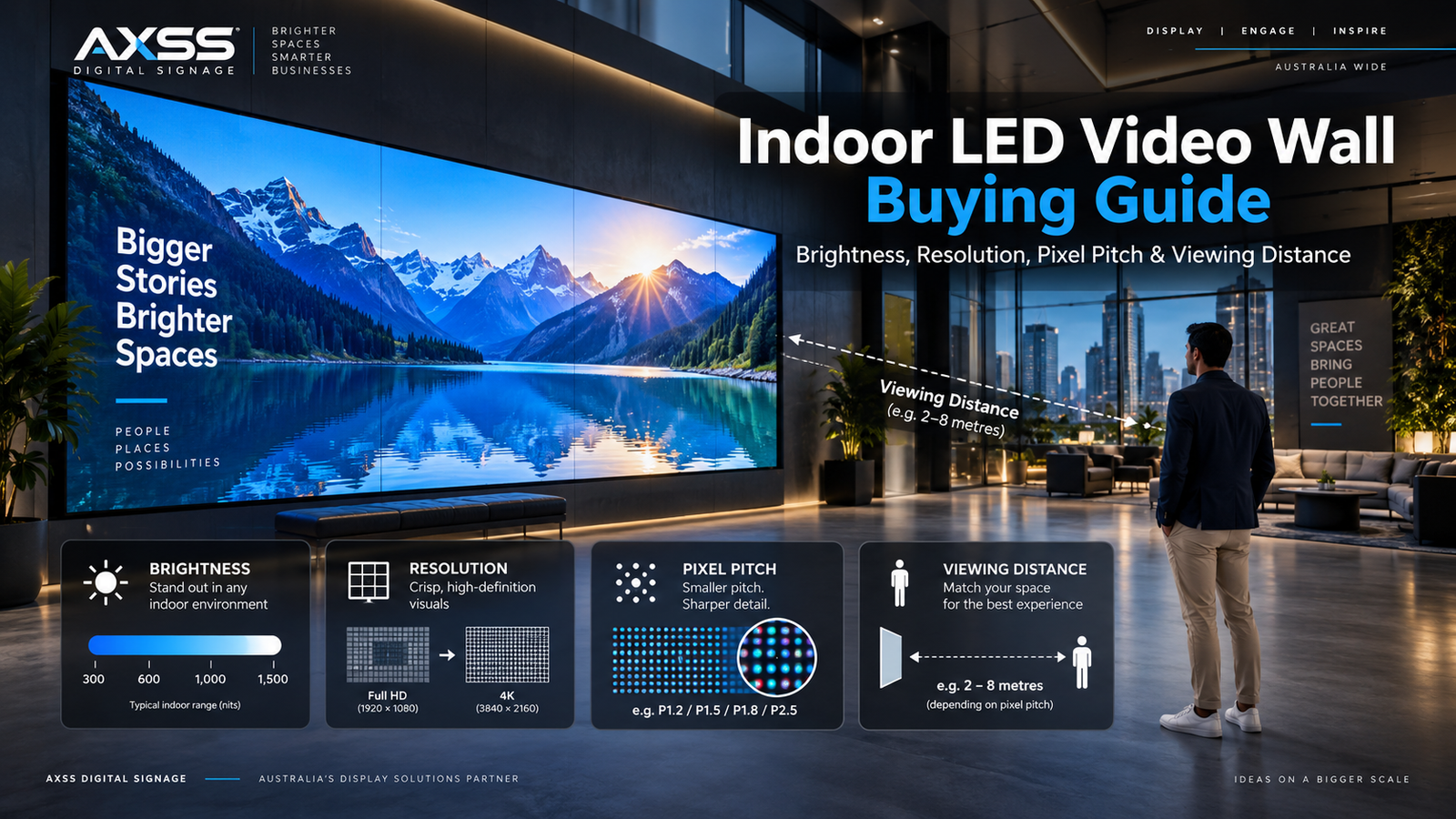
An indoor LED video wall can transform a corporate lobby, showroom, control room, retail store, meeting space or entertainment venue into a powerful visual experience. However, the success of the installation depends on much more than selecting the largest screen that fits the available wall.
Four technical factors have the greatest influence on image quality, readability, viewing comfort and total project cost:
- Brightness
- Resolution
- Pixel pitch
- Viewing distance
These factors are closely connected. Selecting one without considering the others can result in an LED wall that is unnecessarily expensive, uncomfortable to watch, difficult to read or unable to reproduce content at the expected level of detail.
A very fine pixel pitch may look impressive on a specification sheet, but it may provide little practical benefit if the audience is positioned far from the display. A very bright LED wall may attract attention inside a sunlit atrium, but the same brightness could feel harsh in a dark meeting room.
Similarly, a screen may be described as capable of accepting a 4K signal, even though the completed LED canvas does not contain enough physical pixels to display native 4K resolution.
This indoor LED video wall buying guide explains how brightness, resolution, pixel pitch and viewing distance work, how they affect each other and how to evaluate them before investing in a commercial display.
What Is an Indoor LED Video Wall?
An indoor direct-view LED video wall is a large digital display constructed from multiple modular LED cabinets or panels. When the modules are installed, aligned and calibrated correctly, they operate as one continuous visual canvas.
Unlike traditional LCD video walls, direct-view LED displays do not require visible bezel lines between screens. This makes it possible to create seamless displays in a wide range of dimensions and formats.
An indoor LED wall can be designed as:
- A standard 16:9 display
- An ultra-wide panoramic screen
- A large portrait display
- A digital column
- A curved video wall
- A ceiling-mounted display
- An architectural ribbon
- A custom-shaped digital installation
Indoor LED video walls are commonly installed in:
- Corporate reception areas
- Boardrooms and conference rooms
- Retail stores and shopping centres
- Product showrooms
- Universities and lecture theatres
- Museums and galleries
- Hotels and hospitality venues
- Houses of worship
- Broadcast studios
- Security and operations centres
- Auditoriums
- Event and entertainment venues
The modular construction provides considerable design flexibility. However, it also means the video wall must be planned as a complete system.
The LED modules, mounting structure, video processor, content sources, power distribution, ventilation, network connection, control software and maintenance access must all work together.
The most effective selection process therefore begins with the application, content and audience—not with a particular LED product.
The Four Key Factors That Determine LED Wall Performance
Brightness, resolution, pixel pitch and viewing distance should never be treated as separate buying decisions.
Pixel pitch determines how closely the physical LED pixels are positioned. This affects pixel density, image detail and the minimum practical viewing distance. The physical dimensions of the display and its pixel pitch then determine its native resolution.
Viewing distance determines how much image detail the audience can realistically see. Ambient light determines how much brightness is required for the content to remain visible and comfortable.
Before comparing LED wall products, answer the following questions:
- How close can the nearest viewer get to the display?
- Where will most viewers stand or sit?
- What is the maximum viewing distance?
- What type of content will appear on the wall?
- Will the display show small text, dashboards or technical drawings?
- How much natural and artificial light exists in the room?
- Will sunlight fall directly on the LED surface?
- What physical dimensions are available?
- What native pixel resolution is required?
- How will the display be accessed for future maintenance?
Once these questions have been answered, choosing the correct technical specifications becomes significantly easier.
1. Brightness: How Bright Should an Indoor LED Video Wall Be?
Brightness describes the amount of visible light generated by the display. It is normally measured in nits, also referred to as candelas per square metre.
A higher nit value means the screen is capable of producing a brighter image. However, maximum brightness should not be treated as a simple measure of quality.
The best indoor LED video wall is not necessarily the brightest one. It is the display that can produce enough light for the environment while remaining comfortable, efficient and visually balanced.
Commercial indoor LED products are available in different brightness ranges. For example, Samsung’s IEC indoor LED series specifies approximately 600-nit brightness for close-view retail and commercial environments. Higher-brightness indoor products are also available for spaces exposed to significant ambient light.
Why Brightness Matters
The display must be bright enough to compete with the surrounding light.
When brightness is too low:
- Colours may appear faded
- Dark scenes may lose detail
- Text can become difficult to read
- Reflections may overpower the image
- Promotional content may lack visual impact
This is particularly important in shopping centres, glass-fronted showrooms, retail stores and corporate atriums where natural daylight or strong architectural lighting is present.
However, excessive brightness can also create problems.
When an indoor LED wall is too bright:
- Viewers may experience visual discomfort
- The screen may become tiring to watch
- Black areas may appear grey or washed out
- Power consumption may increase unnecessarily
- The display may dominate the room in an unpleasant way
- Long-term operation at maximum output may place additional stress on components
The objective is appropriate brightness, not maximum brightness.
Assess the Actual Lighting Environment
Do not select brightness using a specification sheet alone. The room should be assessed under realistic operating conditions.
Consider:
- Windows and skylights
- Direct sunlight
- Reflections from glass and polished surfaces
- Overhead lighting
- Spotlights
- Architectural lighting
- Daytime and evening changes
- Presentation modes
- Seasonal changes in sunlight
- Nearby digital screens
A boardroom with controlled lighting has very different requirements from a shopping-centre atrium. A control room used by operators for long shifts also requires a different brightness strategy from an advertising display intended to attract attention quickly.
Where possible, inspect the location at different times of day. A room that appears dim during a morning site visit may receive strong afternoon sunlight.
Brightness Adjustment and Scheduling
A professional indoor LED video wall should support adjustable brightness through its controller or management system.
Different presets can be created for:
- Daytime operation
- Evening operation
- Presentations
- Events
- Video conferencing
- Cleaning and maintenance
- Reduced-energy operation
Brightness scheduling is especially valuable in environments where lighting changes significantly during the day.
Operating the wall at full brightness when it is not required can reduce viewing comfort and waste energy. The screen should produce only the level of brightness needed for the content and environment.
Low-Brightness Image Quality
Maximum brightness is only one part of the specification. Many indoor LED video walls operate well below their maximum output for most of the day.
The display should therefore maintain strong image quality when dimmed.
Poor low-brightness performance may produce:
- Colour shifts
- Uneven grey tones
- Visible banding in gradients
- Loss of shadow detail
- Differences between cabinets
- Unstable dark colours
- Flickering in recorded footage
When evaluating a product, ask the supplier to demonstrate it at the brightness level expected in the actual installation. A screen that looks impressive in a high-output showroom mode may perform very differently when reduced to a comfortable boardroom level.
Contrast and Black Level
Brightness should always be assessed together with contrast.
Strong image quality depends on the difference between bright and dark areas of the display. A screen with controlled brightness and deep black levels may look more premium than a brighter screen with washed-out dark areas.
Perceived contrast can be affected by:
- LED package design
- Surface treatment
- Cabinet mask design
- Room lighting
- Reflections
- Calibration
- Content design
- Viewing angle
For premium retail, corporate and presentation environments, good black-level performance is often more valuable than extreme brightness.
2. Resolution: Understanding the Real Pixel Count
Resolution describes the number of physical pixels contained within the completed LED wall.
It is usually expressed as horizontal pixels by vertical pixels.
Common examples include:
- 1920 × 1080 for Full HD
- 2560 × 1440 for QHD
- 3840 × 2160 for 4K UHD
With an LED video wall, the final resolution is determined by two factors:
- The physical dimensions of the active LED surface
- The selected pixel pitch
Resolution is not determined only by the media player, computer or video processor.
A video wall may accept a 4K signal while containing fewer than 3840 × 2160 physical pixels. In that situation, the processor scales the incoming 4K content to the native resolution of the LED canvas.
Native Resolution Versus Input Resolution
These terms are often confused.
Native resolution
Native resolution is the actual number of physical LED pixels across the completed display.
Input resolution
Input resolution is the resolution sent from a source such as:
- A computer
- A media player
- A video conferencing system
- A broadcast system
- A camera
- A digital signage player
- A control-room workstation
For the cleanest image, content should ideally be produced or mapped to the native dimensions of the LED canvas.
This is especially important for:
- Small text
- Dashboards
- Maps
- Spreadsheets
- User interfaces
- Technical diagrams
- Multiple content windows
- Detailed product imagery
Video processors can scale content to fit a different canvas size, but scaling cannot create physical pixels that are not present.
If the native LED resolution is too low, fine details may appear soft or disappear entirely.
How Pixel Pitch and Wall Size Determine Resolution
Pixel pitch is measured in millimetres. The approximate number of horizontal pixels can be calculated by dividing the physical width of the active display in millimetres by the pixel pitch.
Consider an LED wall approximately 6,000 millimetres wide.
At 2.5 mm pixel pitch
6,000 ÷ 2.5 = approximately 2,400 horizontal pixels.
At 1.5 mm pixel pitch
6,000 ÷ 1.5 = approximately 4,000 horizontal pixels.
At 1.2 mm pixel pitch
6,000 ÷ 1.2 = approximately 5,000 horizontal pixels.
The exact result will depend on the cabinet and module dimensions because LED displays are constructed in fixed pixel increments.
However, the example demonstrates why screen size and pixel pitch must be evaluated together.
A physically large wall may achieve 4K resolution with a moderate pixel pitch. A smaller display may require a much finer pitch to achieve the same native pixel count.
Does Every LED Wall Need Native 4K Resolution?
No.
Native 4K resolution can be valuable when:
- Viewers are positioned close to the display
- The content contains small text
- Detailed photography is important
- Multiple data windows must appear simultaneously
- Technical diagrams or drawings are displayed
- Premium image quality is a central objective
- The content workflow is already designed around 4K
However, native 4K may provide limited additional value when:
- Viewers remain far from the display
- Content consists mainly of large headlines
- The wall primarily displays full-screen video
- The display acts as an atmospheric backdrop
- Source content is only available in Full HD
- Fine details cannot be perceived at the normal viewing distance
Paying for pixels that the audience cannot see may not improve the viewing experience.
In some projects, the budget may produce a better overall result when invested in higher-quality processing, improved calibration, a stronger mounting structure, redundancy, spare parts or long-term support.
Aspect Ratio and Content Production
Many indoor LED walls use a 16:9 aspect ratio because it matches standard Full HD and 4K content.
This simplifies content production and reduces the need for cropping or scaling.
However, LED technology also allows custom aspect ratios, including:
- Ultra-wide displays
- Portrait screens
- Narrow digital ribbons
- Square canvases
- Curved installations
- Irregular architectural shapes
Custom dimensions can create impressive installations, but they require a content plan.
A standard 16:9 video placed on an ultra-wide wall may need to be:
- Cropped
- Repositioned
- Extended with branded graphics
- Displayed beside additional content
- Redesigned for the custom canvas
The content team should know the final native pixel dimensions before producing graphics and videos.
Resolution for Text, Data and Dashboards
Text-based content places greater demands on resolution than full-screen video.
A corporate lobby showing brand films may perform well with a lower native resolution than a control room displaying maps, labels and operational data.
When fine detail is important, test the actual content.
Do not evaluate the wall using only cinematic promotional footage. Fast-moving videos and colourful images can look impressive even when pixel density is insufficient for small text.
Display the smallest labels, numbers and interface elements that users will need to read. Then review them from the closest, typical and farthest viewing positions.
3. Pixel Pitch: The Connection Between Detail, Distance and Cost
Pixel pitch is the distance from the centre of one LED pixel to the centre of the next. It is measured in millimetres.
A 1.2 mm LED display places its pixels closer together than a 2.5 mm display.
A smaller pixel pitch creates more pixels within the same physical area. This increases pixel density, improves close-view detail and can reduce the visibility of individual pixels.
Pixel pitch directly influences image clarity, native resolution and recommended viewing distance.
Why Fine Pixel Pitch Costs More
A finer-pitch display contains more LED packages, driver components and electrical connections within each square metre.
It may also require:
- More processing capacity
- More receiving cards
- Higher manufacturing precision
- More detailed calibration
- Tighter installation tolerances
- Greater quality control
For this reason, finer-pitch LED products generally cost more than wider-pitch products of the same physical size. Samsung also notes that fine-pitch walls carry a higher price because substantially more LEDs are required across the display surface.
The Smallest Pitch Is Not Always the Best Choice
It is easy to assume that the smallest available pixel pitch is automatically the best option.
Technically, a smaller pitch can provide higher pixel density. Commercially, it may not provide better value for every installation.
For example, an ultra-fine 0.9 mm wall may be suitable for a boardroom where people sit close to the display and read detailed presentations.
The same 0.9 mm pitch may be unnecessary in an auditorium where the nearest audience member is ten metres away. At that distance, viewers may not perceive the additional pixel density.
The best pixel pitch is not the smallest product available. It is the pitch that provides sufficient detail for the content and viewing distance without adding unnecessary cost.
Common Indoor Pixel Pitch Ranges
Indoor LED products can be grouped broadly into the following categories:
Below 1 mm
Ultra-fine-pitch LED may be considered for premium boardrooms, close-view control rooms, broadcast environments and high-end corporate installations.
Approximately 1.0 to 1.8 mm
Fine-pitch LED is commonly considered for conference rooms, corporate lobbies, retail environments, showrooms and operational displays.
Approximately 1.8 to 2.6 mm
This range may suit larger lobbies, shopping centres, lecture theatres and multipurpose commercial environments where viewers remain several metres away.
Above approximately 2.6 mm
Wider indoor pixel pitches may be suitable for auditoriums, entertainment venues, stage backgrounds and other long-distance viewing applications.
These are practical descriptions rather than universal technical classifications. The correct pitch still depends on the specific location.
Match Pixel Pitch to the Content
A finer pitch is more valuable when the wall displays:
- Small text
- Detailed dashboards
- Spreadsheets
- Product specifications
- Maps
- Technical drawings
- Multiple video windows
- High-resolution photography
- User interfaces
- Close-up camera backgrounds
A wider pitch may be suitable for:
- Full-screen promotional videos
- Large marketing headlines
- Stage graphics
- Ambient motion backgrounds
- Sports footage
- Event branding
- Long-distance audience viewing
Pixel Pitch for On-Camera Applications
When the LED wall will be recorded by a professional camera, pixel pitch is only one consideration.
On-camera performance can also be influenced by:
- Refresh rate
- Scan configuration
- Camera shutter speed
- Frame rate
- Moiré patterns
- Camera distance
- Processing quality
- Colour calibration
- Brightness
- LED package type
A screen may appear smooth to the human eye while showing flicker, lines or patterns through a camera.
Broadcast studios, virtual production environments and hybrid event spaces should test the proposed LED product using the actual camera equipment and expected shooting distances.
4. Viewing Distance: Begin with the Audience
Viewing distance is the space between the LED surface and the person viewing it.
It is one of the most important inputs when selecting pixel pitch.
There is no single perfect formula that applies to every viewer, environment and content type. Different manufacturers and integrators use guidelines for minimum, acceptable or optimal viewing distances.
One established reference estimates optimal viewing distance in metres by multiplying pixel pitch in millimetres by approximately 2.5.
Using that guideline:
- 0.8 mm pitch: approximately 2 metres
- 1.0 mm pitch: approximately 2.5 metres
- 1.2 mm pitch: approximately 3 metres
- 1.5 mm pitch: approximately 3.75 metres
- 1.9 mm pitch: approximately 4.75 metres
- 2.5 mm pitch: approximately 6.25 metres
- 3.0 mm pitch: approximately 7.5 metres
These figures should be treated as design references rather than absolute rules.
Viewing comfort can also be affected by:
- Content detail
- Text size
- Contrast
- Viewer eyesight
- Screen dimensions
- Image movement
- Brightness
- Viewing duration
- Personal expectations
Measure Three Viewing Distances
A professional assessment should identify at least three positions.
Minimum viewing distance
This is the closest position from which anyone is expected to view the screen.
It strongly influences pixel pitch because the individual LED structure becomes more noticeable as the viewer moves closer.
Typical viewing distance
This is where most viewers will normally stand or sit.
The wall should provide its best balance of detail, comfort and impact from this zone.
Maximum viewing distance
This is the farthest relevant viewing position.
It influences:
- Text size
- Graphic scale
- Screen dimensions
- Content duration
- Calls to action
- Overall visual impact
Fine pixel pitch cannot compensate for text that is physically too small to read from the back of a room.
Viewing Distance and Screen Size
Viewing distance should also influence the physical dimensions of the LED wall.
A very large screen viewed from extremely close range may require excessive eye and head movement. A small screen viewed from far away may lack impact and make content difficult to understand.
The screen size, pitch and room layout must work together.
For example:
Boardroom
A boardroom wall may be viewed from approximately two to eight metres. It may need to display presentations, spreadsheets and video calls.
Fine pixel pitch and strong native resolution may be more important than extreme brightness.
Corporate lobby
A lobby wall may be viewed briefly from three to fifteen metres. The content may focus on branding, company videos and large messages.
A slightly wider pitch may provide excellent results if visitors cannot approach the screen closely.
Auditorium
An auditorium display may be viewed from ten to forty metres.
Large content elements and sufficient brightness may be more important than ultra-fine pixel density.
Control room
A control-room wall may be viewed for long periods from fixed operator positions.
Resolution, pixel pitch, brightness control and viewing ergonomics must all be tested carefully.
How the Four Factors Work Together
Brightness, resolution, pixel pitch and viewing distance should be evaluated as one connected system.
Start with the audience and content.
The nearest viewing distance and smallest required content detail help determine an appropriate pixel pitch.
The selected pitch and physical wall dimensions determine the native resolution.
The room’s lighting conditions then determine the required brightness.
Consider a six-metre-wide corporate lobby LED wall.
The nearest viewer stands four metres away, but most visitors see the screen from eight to twelve metres. The content consists mainly of brand videos, event visuals and large headlines.
An ultra-fine 0.9 mm pitch would produce an extremely high native resolution, but much of that resolution may not be noticeable from the typical viewing distance.
A properly selected 1.5 mm or 1.8 mm solution may produce the required visual quality while leaving more budget for processing, mounting, calibration, redundancy and support.
Now consider a control room where operators sit 1.5 metres from the display and read small labels across multiple data windows.
The same 1.8 mm pitch may not provide sufficient close-view detail. A finer pitch and carefully calculated native resolution may be justified.
Neither product is universally better. Each is better for a specific application.
Practical Recommendations by Application
Corporate Lobby
Priorities commonly include:
- Visual impact
- Seamless design
- Brand colour accuracy
- Reliable daily operation
- Integration with architecture
- Easy content management
Viewing distances may vary significantly. Brightness should be selected according to windows, lighting and reflections.
Content should generally use bold visuals and large typography rather than small paragraphs.
Boardroom and Conference Room
Close viewing and text readability are important.
The wall may display:
- Presentations
- Spreadsheets
- Video conferences
- Reports
- Dashboards
- Product demonstrations
Fine pixel pitch, adequate native resolution and good low-brightness performance are often more valuable than very high maximum brightness.
Retail Environment
Retail LED walls must compete with store lighting, reflections and other displays.
Brightness and contrast are important, but the screen should remain comfortable for customers standing nearby.
Detailed product visuals may justify a finer pitch. A large promotional wall positioned high above the sales floor may operate effectively with a wider pitch.
Control Room
Control rooms require:
- High native resolution
- Fine text reproduction
- Reliable operation
- Brightness control
- Redundant system options
- Efficient maintenance access
- Accurate processing
Operators may view the wall for many hours. Excessive brightness can contribute to fatigue, so comfort is as important as visual impact.
Auditorium or Event Venue
The audience is usually farther from the screen, making wider pixel pitches practical.
Brightness must be sufficient to compete with:
- Stage lighting
- House lighting
- Spotlights
- Event production equipment
When cameras are used, refresh rate, processing and scan performance should also be evaluated.
Additional Specifications to Review
Although the four main factors are essential, several other specifications affect the final result.
Refresh Rate
Refresh rate can influence motion quality and camera performance.
This is especially important for:
- Broadcast studios
- Live streaming
- Conferences
- Events
- Virtual production
- Social-media recording
Colour Calibration
The cabinets should produce consistent brightness and colour across the entire wall.
Ask how the system is calibrated and how calibration data is maintained when a module is replaced.
Video Processing
The processor maps incoming content to the LED canvas.
It may also manage:
- Scaling
- Source switching
- Multiple windows
- Colour processing
- Synchronisation
- Redundancy
- Remote control
Confirm that the processor can handle the total native pixel count at the required frame rate.
Front or Rear Maintenance
Many indoor installations use front-service LED cabinets. Modules, receiving cards and power components can be accessed from the viewing side.
This is valuable where the wall is installed close to a structural surface.
Maintenance access should be designed before installation, not after a failure occurs.
Mounting Accuracy
Fine-pitch LED walls reveal small alignment errors.
The supporting structure must be:
- Flat
- Stable
- Rigid
- Accurately adjustable
- Suitable for the total load
The condition of the existing wall and floor should be inspected before installation.
Power and Heat
LED walls require planned electrical distribution and generate heat.
The project should confirm:
- Maximum power consumption
- Typical power consumption
- Required electrical circuits
- Cable routes
- Ventilation
- Room cooling
- Heat dissipation
- Emergency isolation
Redundancy
Mission-critical applications may require redundant:
- Power supplies
- Data paths
- Receiving cards
- Controllers
- Video processors
The appropriate level of redundancy depends on the operational impact of downtime.
Common Indoor LED Video Wall Buying Mistakes
Choosing a Wall Based Only on Pixel Pitch
Pitch does not describe colour quality, processing, serviceability, calibration or reliability.
Two LED products with the same pitch may deliver significantly different results.
Selecting the Highest Brightness
More brightness does not automatically mean better indoor performance.
The display should deliver the required output while maintaining strong colour, contrast and grayscale quality at normal operating levels.
Assuming 4K Input Means Native 4K
A processor may accept 4K content even when the physical LED canvas has fewer pixels.
Always confirm the total horizontal and vertical native resolution.
Ignoring the Closest Viewer
The average viewing distance is not enough.
People may walk directly toward the screen in a lobby, showroom or retail space. Measure the true minimum distance before choosing pixel pitch.
Ignoring Content Production
A custom ultra-wide display requires content designed for its actual aspect ratio and native resolution.
Without a content strategy, premium hardware may show stretched, cropped or poorly positioned visuals.
Comparing Quotes Only by Price
A lower quote may include:
- Wider pixel pitch
- Lower native resolution
- Lower-quality processing
- Fewer spare modules
- Reduced redundancy
- Limited warranty
- Weaker technical support
- Less accurate mounting
Compare the complete system rather than the price per square metre alone.
Frequently Asked Questions
What is the best pixel pitch for an indoor LED wall?
There is no single best pixel pitch. The correct choice depends on the minimum viewing distance, required content detail, physical screen size and available budget.
How bright should an indoor LED video wall be?
Brightness should match the room’s lighting conditions. A display in a controlled meeting room may require much less brightness than one installed in a sunlit atrium.
Adjustable brightness is generally more valuable than an extremely high maximum rating.
Does smaller pixel pitch always mean better image quality?
A smaller pitch increases pixel density and improves close-view detail. However, the difference may not be visible when viewers are positioned far away.
Can an LED video wall display native 4K?
Yes, provided the completed canvas contains approximately 3840 × 2160 physical pixels and the processor and content workflow support that resolution.
How do I calculate LED wall viewing distance?
A commonly used optimal-viewing reference multiplies the pixel pitch in millimetres by approximately 2.5 to estimate distance in metres.
The result should still be tested using the actual content and audience positions.
Is direct-view LED better than an LCD video wall?
Direct-view LED provides a seamless image, flexible dimensions and strong brightness.
LCD video walls may remain suitable where very close viewing, standard dimensions or a lower initial investment are priorities.
The correct technology depends on the application.
Choose the Right Indoor LED Video Wall with AXSS
An indoor LED video wall is a long-term visual and technical investment.
The best result does not come from automatically selecting the smallest pixel pitch, highest resolution or brightest display available.
It comes from matching brightness, resolution, pixel pitch and viewing distance to the room, audience and content.
AXSS helps businesses plan indoor LED video wall solutions for corporate, retail, hospitality, education, entertainment and operational environments.
Our planning process considers:
- Site dimensions
- Minimum and typical viewing distances
- Ambient lighting
- Required native resolution
- Pixel pitch
- Screen brightness
- Mounting structure
- Video processing
- Content management
- Maintenance access
- Ongoing support
Before recommending a system, we evaluate how the display will actually be used. This helps prevent unnecessary cost while ensuring the LED wall provides the clarity, visual impact and reliability required for the project.
Contact AXSS to discuss your indoor LED video wall, arrange a site assessment and receive a tailored recommendation for screen size, brightness, resolution, pixel pitch and viewing distance.